How to Take Airbnb Photos With Your Phone (Skip the 0.5x)
Phone-only Airbnb photo guide: the settings, height and lens to use, and why Airbnb itself warns against ultra-wide shots that make rooms look bigger.
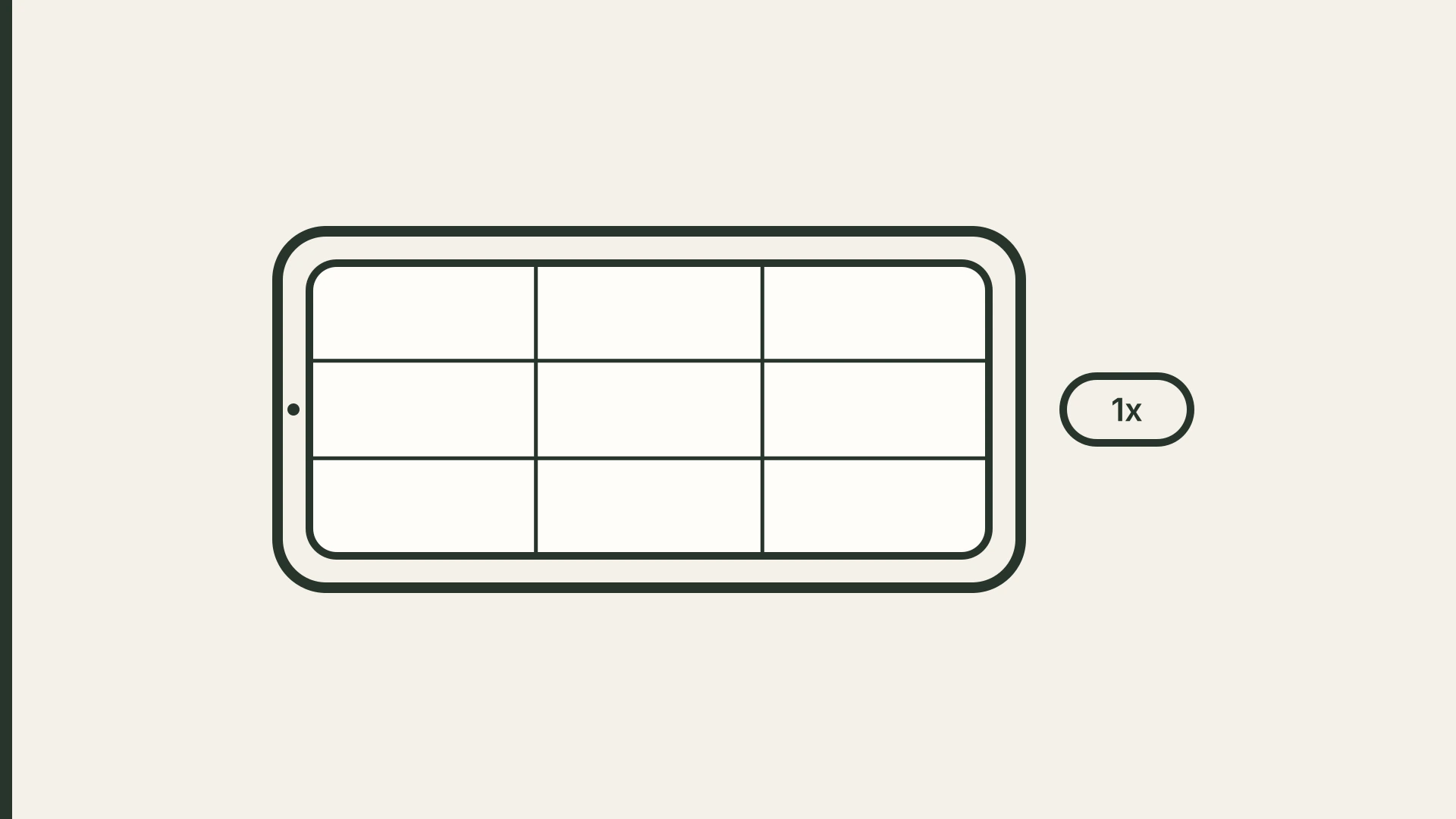
You don't need a photographer to get good listing photos. You do need to stop tapping 0.5x.
The ultra-wide lens is the most tempting button on a modern phone. One tap and the whole bedroom fits in the frame. The trouble is that it doesn't show the bedroom a guest will walk into. It shows a stretched version: the bed sits farther from the wall, the floor looks bigger, and the edges of the frame bend outward. The guest books that version and then arrives at the real one.
Airbnb says so directly. Its host guidance on setting expectations tells you to "avoid ultra-wide angles and over-editing, which make the space look bigger or brighter than it is." The guidelines Airbnb gives its own professional photographers go further. They rule out "fish-eye or super wide-angle lenses to make rooms appear larger than they are," flash, over-processing, and "unusual angles that wouldn’t be seen by someone standing normally in the space."
That last line is the whole method. Shoot what a person standing in the room would actually see. Everything below is how to do that with the phone you already own.
Why the 0.5x shot costs you later
A wide shot can win the click. It loses later, in the gap between the photos and the room.
A guest is unlikely to write "your lens was too wide." If they notice, it comes out as "smaller than it looked" or "not as pictured," and it comes after the stay, when it's too late to fix. If you want to compare the two ways photos go wrong, overselling and underselling, read fancy photos vs honest photos.
Your goal isn't the biggest-looking room. It's the room as it is, in its best light. If you suspect your place is better than your bookings suggest, the photos are a good place to look first, and this guide to checking whether your photos make a good place look worse walks through it.
Set up your phone first (five minutes, once)
- Turn on the grid. On iPhone, go to Settings > Camera and turn on Grid and Level (Apple's steps). On Android, look for a grid option in the camera app's settings; the name and location vary by phone. Airbnb's photo tips recommend grids to help you line things up.
- Turn off the flash. Airbnb's photo tips say it plainly: turn off the flash, open the blinds, and turn on room lights only if natural light isn't enough.
- Leave Lens Correction on (iPhone). Apple says that on supported models this setting adjusts Ultra Wide and front-camera photos "for more natural-looking results," and that it's on by default. You'll find it under Settings > Camera (Apple's camera settings page). It helps if you really do need 0.5x for one tight space, but it doesn't make an ultra-wide shot honest.
- Use the main 1x camera. That's your default for every room. If a room won't fit at 1x, step back into a doorway or corner before you reach for 0.5x.
- Shoot horizontal. Airbnb's photo tips say horizontals work better than verticals because photos are cropped into squares in search results and the listing page displays them in landscape.
Set up the room
- Clean and declutter. Remove what a guest wouldn't find at check-in: chargers, toiletries, the pile on the counter.
- Open every blind and curtain. Shoot when the room gets the most daylight, which is also Airbnb's advice. If it's still dim, turn on the lights. For rooms that stay dark, see how to brighten dark Airbnb photos.
- Make the bed tight and straight. Wrinkles show more on camera than in person.
- Wipe the lens. A smudged lens makes phone photos look hazy. On supported models, an iPhone will even suggest cleaning the lens when it detects a smudge.
How to frame each shot
Keep the phone level, at about chest height. Airbnb tells hosts to shoot straight ahead, from a neutral position, without tilting the lens up or down. Chest height is a practical way to do that. Hold the phone much higher and you end up angling it down at the furniture. Hold it much lower and the ceiling takes over the frame.
Keep vertical lines vertical. Use the grid. Door frames and wall corners should run parallel to the vertical grid lines. If they lean, the phone is tilted, so level it now rather than fixing it later.
Shoot from a corner or doorway at 1x. Backing into a corner shows two walls and most of the floor without stretching anything. That's usually enough for a bedroom or living room.
Then move closer. Airbnb recommends "a mix of wide, mid-range, and close-up images." The wide shot shows the layout. The mid-range shot shows the bed, sofa or table. The close-up shows what a guest can't judge from far away: the coffee setup, the desk, the shower.
Shoot exteriors at golden hour. Airbnb's tip for outdoor photos is the "golden hours," which it defines as the 60 minutes after sunrise and before sunset.
A simple shot list
For each room or space guests can use:
- One wide shot from a corner or doorway, at 1x
- One or two mid-range shots of the main piece of furniture
- One detail that answers a question, like the bed linens, the workspace or the kitchen basics
Then add the exterior and entrance, parking, any outdoor space, and anything guests ask about in messages. Airbnb's photo tour sorts photos by room, and its Help Center says every room or space needs at least one photo to appear in the tour. Once you have the set, pick and order your opening photos with the first five photos guide.
Quick edits that stay honest
Airbnb's photo tips suggest adjusting brightness, contrast and highlights, using tools like your phone's auto-edit button, and cropping or straightening as needed. That's the safe zone: exposure, color, straight lines.
Airbnb's ground rules for hosts draw the line. Airbnb says it will ask hosts to remove content if AI or other digital technology has been used to "edit flaws, hide damage, add amenities or attributes that are not part of a listing, or otherwise misrepresent the listing." So brighten the room, don't repaint it. And if Airbnb's own AI starts changing what guests see, here's how to spot and fix those edits.
If you'd rather not edit each photo by hand, a listing photo editor can handle the exposure and color pass. Your phone's built-in auto-adjust works too. Either way, compare the result with the real room before it goes live.
Before you upload
- Check the size. Airbnb's Help Center asks for photos of at least 1024 × 683 pixels, and its photo tips suggest at least 1200 × 800, with bigger files better up to about 10 MB. A full-size photo from a recent phone clears that easily. Upload the original, not a screenshot or a copy saved from a messaging app, which may be compressed.
- Check every photo at thumbnail size. If you can't tell what room it is on your phone screen, reshoot it.
- Write a caption where the photo can't say it. Airbnb suggests captions that explain what a photo doesn't show, like which floor a bedroom is on.
- Run the doorway test. Would a guest standing in the doorway say "yep, that's it"? If not, it's the wrong photo.
None of this needs new gear. A level phone at 1x, daylight, and an honest edit get you photos that match the stay, which is the whole job.
Sources
- Airbnb Resource Center: Setting clear expectations with every guest
- Airbnb Help Center: professional photo shoot guidelines
- Airbnb Resource Center: How to take great photos for your listing
- Airbnb Help Center: listing photo tips, photo tours and ground rules for hosts
- Apple Support: Change advanced camera settings on iPhone and Use iPhone camera tools to set up your shot
FAQ
Is it ever OK to use the 0.5x lens?
Sometimes. For a space that can't be shown at 1x, like a narrow bathroom, it may be the only option. Keep the phone level, leave Lens Correction on if you have an iPhone, and compare the photo with the real room. If it looks bigger on screen than in person, reshoot at 1x or add a caption. Airbnb's guidance is to avoid ultra-wide angles that make a space look bigger than it is.
Do I need a tripod?
No. A tripod helps keep the phone level and steady in dim rooms, but daylight and steady hands are enough for most listings.
Should Airbnb photos be portrait or landscape?
Landscape. Airbnb's Help Center and its photo tips both recommend horizontal photos, because vertical shots don't display as well in search results or on the listing page.
What resolution should Airbnb photos be?
At least 1024 × 683 pixels, per Airbnb's Help Center. Its photo tips suggest at least 1200 × 800, with bigger files better up to about 10 MB.
Published October 20, 2026 / 7 min
Related Reading
How to Fix Your First Five Airbnb Photos Tonight Without Hiring a Photographer
Your 27th photo can't rescue a weak first impression.
June 3, 2026
6 min
How to Brighten Dark Airbnb Photos in One Sitting Without a Full Reshoot
A dark photo can make a clean home feel old, cold, cramped, or forgotten.
May 27, 2026
7 min
How to Choose Between Fancy Photos and Honest Photos Without Lying About Your Place
Better photos should create desire and protect trust at the same time.
May 23, 2026
6 min